89 Days to CCIE SEC v6.1 Lab
Identity Services Engine (ISE) & 802.1X
ISE Feature
New Certificate with ISE
ISE 2.4 AD Join
Installing Cisco ISE 3.0 in VMware ESXi
Cisco ISE and the IEEE 802.1X standard. While the theory is straightforward, the “real-world” implementation involves a complex dance of protocols and certificates.
The Architecture: The Three Pillars
802.1X is not a single protocol; it is a framework involving three distinct roles:
- The Supplicant: The endpoint (Laptop, IP Phone, IoT device) running software that supports 802.1X.
- The Authenticator: The network access device (NAD)—usually a Switch or Wireless LAN Controller (WLC). It acts as a “gatekeeper.”
- The Authentication Server (ISE): The “brain” that validates credentials and pushes down policies.
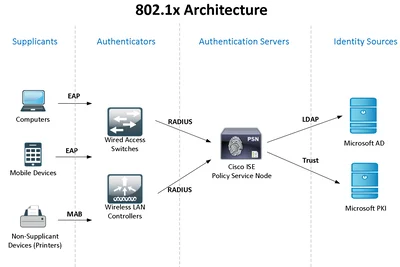
The 802.1X Flow
To understand how this works in a production environment, you have to look at the encapsulation layers. The process moves from EAPOL (EAP over LAN) between the client and switch, to RADIUS between the switch and ISE.
1. The Negotiation Phase
When a device connects, the switch port is in an “unauthorized” state, allowing only EAPOL, CDP, and STP traffic.
- The Switch sends an EAP-Request/Identity frame.
- The Supplicant responds with an EAP-Response/Identity containing the username or machine certificate.
2. The RADIUS Tunnel
The switch takes this EAP response, wraps it in a RADIUS Access-Request packet, and sends it to ISE. This is crucial: The switch does not validate the credentials; it simply acts as a proxy.
3. EAP Method Selection (The Secure Tunnel)
Most modern enterprises use EAP-TLS (Certificate-based) or PEAP-MSCHAPv2 (Username/Password).
- EAP-TLS: Provides the highest security. A TLS tunnel is built where both the server and the client exchange digital certificates.
- ISE’s Role: ISE checks the certificate’s validity against the Certificate Authority (CA) and ensures the account is active in Active Directory (AD).
4. Authorization & Enforcement
Once authenticated, ISE sends a RADIUS Access-Accept. This packet isn’t just a “Yes”; it contains Authorisation Profiles such as:
- VLAN ID: Moving the user from a “Quarantine” VLAN to “Finance.”
- dACL (Downloadable ACL): Restricting the user to specific IP addresses.
- SGT (Scalable Group Tag): For TrustSec-enabled environments.
To prevent widespread network outages, Cisco recommends a phased approach using specific deployment modes that shift the balance from visibility to strict enforcement.
1. Monitor Mode (Visibility Phase)
In this initial stage, the network is configured for 802.1X, but access is not restricted.
- How it works: The switchport is set to
authentication open. While endpoints are prompted for credentials and ISE processes the request, the port remains open regardless of the authentication result. - Technical Goal: Gather data and identify endpoints that lack 802.1X supplicants (e.g., printers, IoT) or have expired certificates.
- Real-World Use: Used to “audit” the network for several weeks to ensure all legitimate devices can authenticate before turning on enforcement.
2. Low-Impact Mode (Graduated Enforcement)
This mode introduces basic security while still allowing critical services to function pre-authentication.
- How it works: A Pre-Authentication ACL (PACL) is applied to the switchport. This ACL typically permits only essential traffic—like DHCP, DNS, and PXE boot—to allow a machine to start up and reach the network to authenticate.
- Enforcement: Once the user authenticates, ISE pushes a Downloadable ACL (dACL) or assigns a new VLAN to grant full access.
- Real-World Use: Ideal for environments with “thin clients” or machines that need to download an OS/updates before the 802.1X service can start.
3. Closed Mode (High Security)
This is the “gold standard” for a secure environment but requires the most preparation.
- How it works: The port is completely locked down by default. No traffic is allowed except for EAPoL (Extensible Authentication Protocol over LAN).
- Enforcement: The device receives zero network access—not even an IP address—until it successfully completes authentication.
- Real-World Use: Used in highly secure areas or SD-Access fabrics where you want to ensure no “rogue” device can even send a single packet into the network without being identified.
ISE Authorization is the process that determines the level of access a device receives after it has successfully proven its identity (Authentication).
Authorization works through a top-down evaluation of rules that result in the delivery of specific network permissions to the access switch or wireless controller.
1. The Authorization Rule Logic
ISE evaluates Authorization Policies using a “First Match” approach. Each rule consists of:
- Conditions: These are “If” statements based on context. For example: If (User is in AD-Finance-Group) AND (Device-Type is Windows-Laptop) AND (Location is HQ).
- Permissions (Results): If the conditions are met, ISE assigns an Authorization Profile—a container of specific access instructions.
2. The Authorization Profile (What gets pushed?)
When a rule matches, ISE sends a RADIUS Access-Accept message back to the network device. This message contains “Attributes” that tell the hardware how to restrict the port:
- VLAN Assignment: Moves the device to a specific segment (e.g., VLAN 20 for HR).
- Downloadable ACL (dACL): A dynamic access list pushed from ISE to the switch to restrict specific traffic (e.g., allow only SQL server access).
- Scalable Group Tag (SGT): A tag used in Cisco TrustSec for group-based segmentation instead of traditional IP-based ACLs.
- Voice Domain Permission: Automatically places IP phones into the voice VLAN.
3. Change of Authorization (CoA)
Authorization is not always static. If a device’s status changes (e.g., a “Posture” scan finds it is missing an antivirus update), ISE can send a CoA message.
- The switch receives this request and immediately re-evaluates the device’s access, often moving it to a “Quarantine” VLAN without the user having to unplug and replug their cable.
Summary of the Flow
- Request: Device authenticates successfully.
- Match: ISE matches the session against Authorization Policy rules.
- Instruction: ISE sends the selected Authorization Profile via RADIUS.
- Enforcement: The switch applies the VLAN, dACL, or SGT to the physical port.
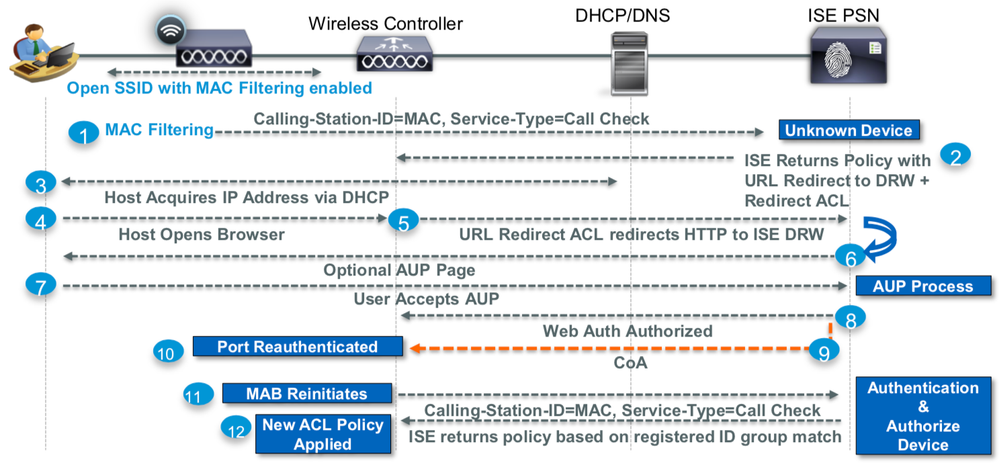
Guest Access Flows :
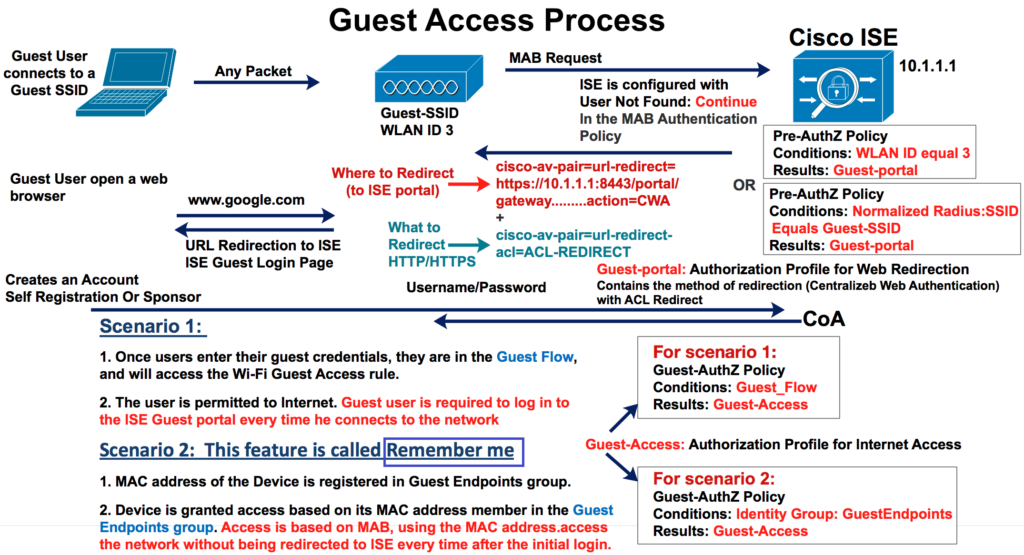
Happy Labingggggggggggggggggggggggggg !