86 Days to CCIE SEC v6.1 Lab
Cisco Dynamic ARP Inspection (DAI)
Layer 2 is often the most vulnerable frontier. Without protection, an attacker can easily execute ARP Poisoning to redirect traffic, sniff sensitive data, or launch a Man-in-the-Middle (MITM) attack. Dynamic ARP Inspection (DAI) is the industry-standard solution for locking down these gaps.
1. The Concept: Why DAI Matters
ARP is inherently trusting; it accepts any reply even if no request was sent. DAI ends this “blind trust” by intercepting all ARP packets on untrusted interfaces and validating them against a source of truth—typically the DHCP Snooping Binding Database.
- Trusted Interfaces: Typically connected to switches, routers, or servers. Traffic bypasses DAI checks.
- Untrusted Interfaces: Ports where end-users connect. Every ARP packet is inspected.
- The Validation Logic: If the Sender MAC and Sender IP in the ARP packet do not match an entry in the binding table, the switch drops the packet and logs the violation.
2. Real-World Use Case: The Office “Sniffer”
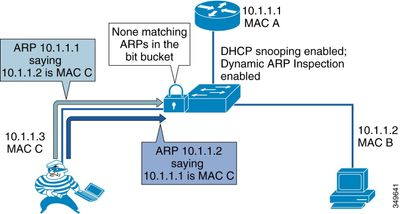
Imagine an employee plugs a laptop into a wall jack and runs an ARP spoofing tool. They claim to be the Default Gateway (10.1.1.1).
- Without DAI: Other workstations update their ARP tables with the attacker’s MAC. Traffic meant for the internet now flows through the attacker’s laptop.
- With DAI: The switch sees an ARP reply from an untrusted port claiming to be
10.1.1.1. It checks its DHCP Snooping table, sees that the port is actually assigned to10.1.1.55, and immediately drops the malicious packet.
3. Lab Build: Sample Configuration
DAI requires DHCP Snooping to be enabled first, as it provides the database DAI uses for validation.
Step 1: Enable DHCP Snooping (Prerequisite)
SW1(config)# ip dhcp snooping
SW1(config)# ip dhcp snooping vlan 10
SW1(config)# interface GigabitEthernet1/0/24  # Uplink to DHCP Server/Router
SW1(config-if)# ip dhcp snooping trust


Diagram (Source from the Internet)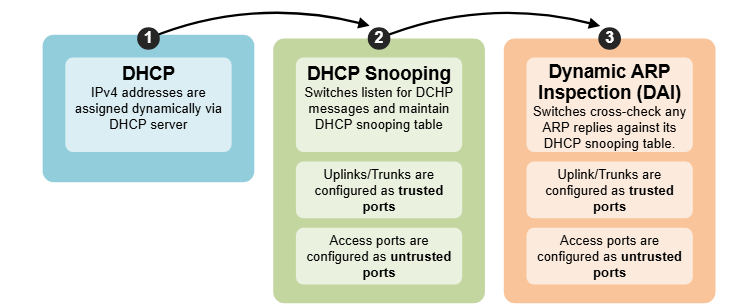
Happy Labinggggggggggggggggg !