Installing and Configuring SYSLOG-NG on Ubuntu 16.10 in 30min.
I have been thinking since long to setup a centralized log server for easy use and get alerts when the devices have warnings.
I have done some logging servers before to monitor big network with 1000000 home users, but it was vert hard to write scripts and automate them with perl and normalize to MySQL.
After ELK the life become simple, and it is easy task and fast search, you can log anything and make available to search easy.
So i have created a LAB setup with number of vendor devices like :
Cisco Routers
Cisco Switches
Cisco Nexus
Cisco ASA
—Add vendors here
Lets start with basic installation of Ubuntu 16.10 .
1. Requirements
Download and install Ubuntu 16.10 server ISO from Ubunut site.
Install ubunut following basic installation steps : https://www.howtoforge.com/ubuntu-14.10-utopic-unicorn-server
Configuring Logstash to accept winlogbeats messages from windows 2012 R2 Server
my beat.conf looks like below
root@syslog:/etc/logstash/conf.d# more beat.conf
input {
beats {
port => 5043
}
}
output {
elasticsearch {
hosts => “192.168.1.67:9200”
manage_template => false
index => “%{[@metadata][beat]}-%{+YYYY.MMM.dd}”
document_type => “%{[@metadata][type]}”
}
}
Save the conf file.
Restart Logstash
# service logstash restart
Login to Windows 2012 R2 Server and Test the connection.

Now Logstash listening on port 5043, let install winlogbeat on Windows 2012 R2 to ship the logs to Logstash.
winlogbeats installation and configuring
Download and extract winlogbeat from elasticsearch.co
https://www.elastic.co/downloads/beats/winlogbeat
Extract on Desktop or desired folder
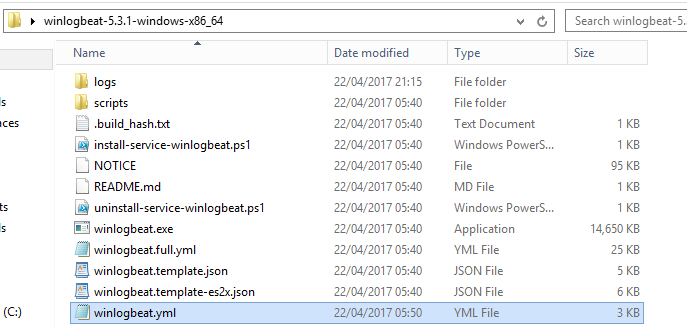
Edit winlogbeat.yml and modify basic steps to work with Logstash.
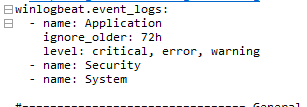

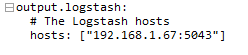
Save the configuration file.
Testing and installing winlogbeat template with kibana
PS C:\Program Files\Winlogbeat> Invoke–WebRequest –Method Put –InFile winlogbeat.template.json –Uri http://192.168.1.67:9200/_template/winlogbeat?pretty –ContentType application/json
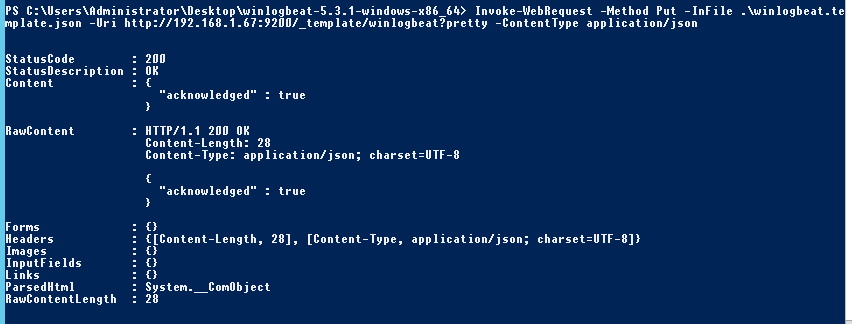
Now the template is registered and working.
Now using powershall script make winlogbeat as services.

Once above steps successfully you can start the services by manually or go in to services and start winlogbeat service.

Now the Service up and running, lets check the winlogbeats shipping the logs to logstash.
(make sure in Logstash server /usr/share/logstash read and writable by logstash user (or any other user if you using different than default).
PS C:\Users\Administrator\Desktop\winlogbeat-5.3.1-windows-x86_64> Get-Content .\logs\winlogbeat -Wait
You can see now the data shipping to Logstash we have setup on port 5043

Happy Labbing !!!!