Open-Source Models
I have been working lot these days to test Local LLM that fits and work as smooth as possible on my Legacy hardware
I am running llama.cpp with gguff models as below for testing :
Llama-3.2-3B-Instruct-Q4_K_M.gguf
Qwen3-8B-Q4_K_M.gguf
Qwen3.5-2b-Kimi-and-Opus-Distillation.Q8_0.gguf
TwIL-LM3-Pro-Q4_K_M.gguf
gemma-3-1b-it-f16.gguf
gemma-4-E2B-it-heretic-Q4_K_M.gguf
gemma-4-E2B-it-heretic-Q5_K_M.gguf
gemma-4-E2B-it-heretic-mmproj-F16.gguf
gemma4-coding-Q4_K_M.gguf
So the question come to me what the meaning after the model we see K, M and some numbers what that means to me
Lets Look below and understand that.
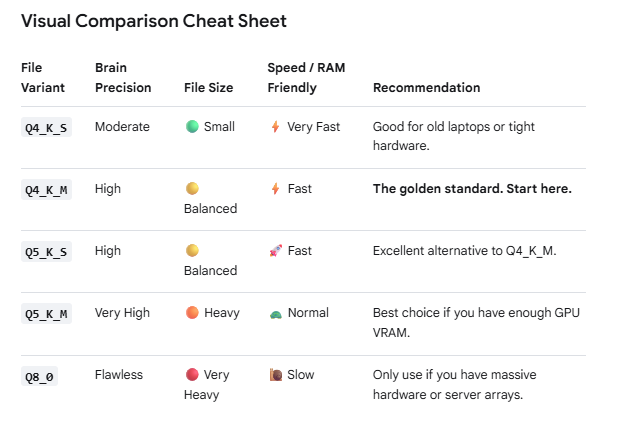
The numbers (3, 4, 5, 6, 8) stand for the number of bits used per weight (quantization level),
while the suffixes (KS, KM, KL) describe the size configuration (Small, Medium, Large) of the quantization method.
In local LLMs, a standard model is compressed (quantized) from 16-bit down to smaller sizes so it can fit into your computer’s RAM or GPU VRAM.
The Number (Bits per Weight)
The lower the number, the smaller the file size and the faster it runs, but you lose a bit of the model’s intelligence.
- Q3 (3-bit): Ultra-compressed. The file size is tiny and incredibly fast, but the model loses significant accuracy and might write broken sentences or gibberish. (Not recommended unless you have very low RAM).
- Q4 (4-bit): The Industry Sweet Spot. It shrinks the model file size by roughly 70% while retaining about 95%+ of the original model’s intelligence.
- Q5 (5-bit): The Best Balance. Slightly larger file size than Q4, but recovers almost all precision loss. Highly recommended if your system has the extra room.
- Q6 (6-bit): Near-perfect quality. It is mathematically identical to the unquantized model to the human eye, but the file size begins to get heavy.
- Q8 (8-bit): Maximum quality quantization. Very heavy file sizes, but zero noticeable drop in intelligence.
The Suffixes (K-Quant Sizes)
When using the modern “K-quant” method (like Q4_K_M), different parts of the model are compressed at different strengths. Critical “brain” layers get less compression, while less important layers get compressed heavily.
- S (Small / KS): Compresses almost all layers down to the target bit size. It results in the smallest file size possible for that number but sacrifices a tiny bit of intelligence.
- M (Medium / KM): The Recommended Default. It keeps the most critical layers at a higher precision while compressing the rest. It provides the best performance-to-file-size ratio.
- L (Large / KL): Compresses very few layers aggressively. It gives the absolute highest precision for that bit-level, but the file size is the largest.
--mmproj flag
gemma-4-E2B-it-heretic-mmproj.gguf
- Images: A paperclip/image icon will unlock next to your chat box in the default browser GUI allowing you to drag-and-drop or upload photos.
- Audio: If your frontend wrapper supports microphone inputs, it will now successfully forward audio binaries or base64 sound chunks over the server’s API endpoints without crashing out.
–mmproj ~/models/gemma-4-E2B-it-heretic-mmproj.gguf
You can use on GUI image and Audio for the Local LLM to review and deliver the outcome
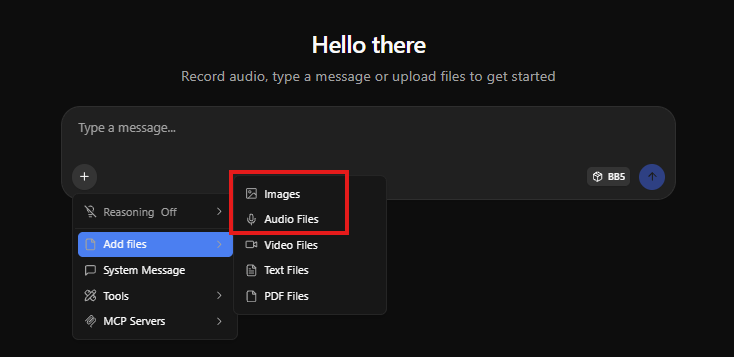
Example i use like below to get best outcome
./build/bin/llama-server
-m ~/models/gemma-4-E2B-it-heretic-Q5_K_M.gguf
–mmproj ~/models/gemma-4-E2B-it-heretic-mmproj.gguf
-a “BB5”
-c 131000
-ngl 80
–parallel 1
-t 16
-tb 32
-b 2048
-ub 1024
–flash-attn auto
–cache-type-k q4_0
–cache-type-v q4_0
–no-mmap
–host 0.0.0.0
–port 8080
–log-file /var/log/llama_server.log
–log-colors on
–metrics
–context-shift
–fit on
–fit-ctx 16384
–keep 1
-n -1
i get below token process speed.

Happy Labbing……………..!