Cisco StackWise vs. StackWise Virtual
As network designs evolve toward the Cisco Catalyst 9000 family, engineers must choose between two fundamentally different virtualization paths: Traditional StackWise and StackWise Virtual (SVL). (old VSS)
While both technologies create a single logical switch with a unified control and management plane, they serve entirely different roles in your network hierarchy.
1. Traditional StackWise: The High-Density Access King.
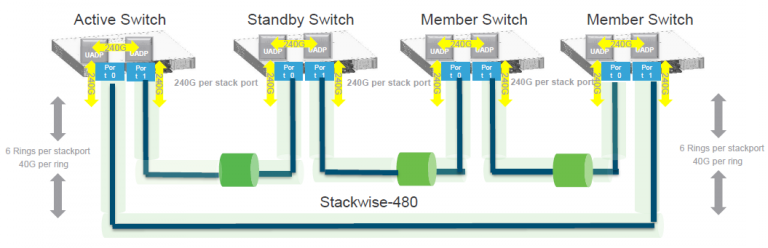
Traditional StackWise (like StackWise-480 found on the Catalyst 9300) is designed for the access layer. It is built for raw port density and local resiliency within a single equipment rack.
- How it Works: Switches are physically linked using proprietary, high-speed Stack Cables on the back of the chassis, forming a bidirectional ring topology.
- Scalability: You can stack up to 8 or 9 members into a single logical unit, allowing you to manage hundreds of ports via one IP address.
- The “Secret Sauce”: StackWise supports StackPower, a unique feature that lets switches share power supplies across the stack to protect against individual PSU failures.
2. StackWise Virtual (SVL): The Distribution & Core Specialist

StackWise Virtual is the functional successor to Cisco VSS (Virtual Switching System). It is designed to provide high availability for your network’s distribution or core layers.
- How it Works: Instead of proprietary cables, SVL uses standard front-panel Ethernet ports (10G, 40G, or 100G) to link two switches over fiber or DAC cables.
- The Virtual Link: Communication between the two chassis is encapsulated in a special 64-byte StackWise Virtual Header (SVH).
- Scalability: SVL is strictly limited to 2 members.
- Distance: Since it uses standard fiber optics, your two switches can be located in different racks, floors, or even different buildings across a campus.
Technical Deep Dive: Comparison Table
| Feature | Traditional StackWise | StackWise Virtual (SVL) |
|---|---|---|
| Typical Layer | Access Layer | Distribution / Core |
| Connection Type | Proprietary Stack Cables | Standard Ethernet Uplinks |
| Topology | Bidirectional Ring | Logical Virtual Pair |
| Member Limit | Up to 8 or 9 | Strictly 2 |
| Max Distance | ~3 Metres (Cable limited) | Kilometres (Fiber limited) |
| Licensing | Essentials or Advantage | Network Advantage Only |
| Key Advantage | High port density & StackPower | Geographic redundancy & No STP loops |
3. Critical Deployment Considerations
Licensing “Gotcha”
One of the most common configuration hurdles is licensing. While traditional stacking is often available on “Essentials” code, StackWise Virtual requires a Network Advantage license. If you try to run SVL commands on an Essentials-licensed switch, the CLI will simply not recognize the commands.
Eliminating Spanning Tree
Both technologies allow you to use Multi-Chassis EtherChannel (MEC). This lets you connect a downstream switch to both members of a stack using a single logical Port-Channel. Because the stack acts as one switch, all links remain active (forwarding) rather than being blocked by Spanning Tree, effectively doubling your available uplink bandwidth.
Dual-Active Detection (DAD)
Because SVL members are physically separated, a failure of the virtual link could lead to a “split-brain” scenario where both switches think they are the master. To prevent this, SVL requires a Dual-Active Detection (DAD) link—a separate physical connection used specifically to heartbeat the peer’s health.
Which One Do You Need?
- Choose StackWise if you are stacking Catalyst 9200/9300 switches in a single closet and need to maximize port count while sharing power.
- Choose StackWise Virtual if you are deploying Catalyst 9400/9500/9600 in your core and need a loop-free, high-availability pair that can span long distances.
Happy Labingggggggggggggggg !